Dec 14 2025
/
Netgear WiFi Range Extenders: The Ultimate Guide to Better Signal
There is nothing more frustrating than a frozen video call right in the middle of an important presentation. Or perhaps you are trying to stream a training video, but the buffering wheel just keeps spinning. These connectivity interruptions are often caused by “dead zones”—areas in your home or office where the wireless signal simply cannot reach.
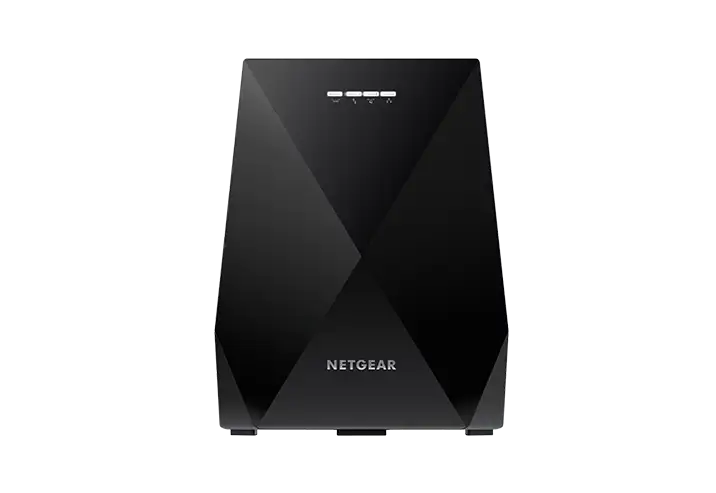
While upgrading your main router is one option, it isn’t always the most efficient or cost-effective solution, especially if your current hardware is relatively new. This is where Netgear WiFi Range Extenders come into play. These powerful devices bridge the gap between your router and the furthest corners of your space, ensuring seamless connectivity for all your devices.
At Magnus, we understand that reliable networking is the backbone of modern business and daily life. As your trusted IT distribution partner, we specialize in delivering cutting-edge products in Networking & Wireless, Security Surveillance, Unified Communication, and Server & Storage. Here is everything you need to know about boosting your network with Netgear technology.
What Are Netgear WiFi Range Extenders?
A WiFi range extender, sometimes called a booster or repeater, acts as a bridge. It receives the existing WiFi signal from your router and rebroadcasts it to areas that are currently suffering from weak or non-existent coverage.
Think of it like a relay race. Your router passes the baton (the data signal) to the extender, which then runs the rest of the distance to your laptop, smartphone, or smart TV. Netgear WiFi Range Extenders are engineered to perform this task with minimal speed loss, ensuring that your extended network remains fast and stable.
These devices are particularly useful in environments with:
- Thick walls or concrete structures: Materials like brick and metal can block wireless signals.
- Multiple floors: Signals often struggle to travel vertically between basements and upper levels.
- Large square footage: Standard routers have a limited broadcast radius that might not cover a large warehouse or sprawling office.
Key Features of Netgear WiFi Technology
When you choose a Netgear WiFi Range Extender, you aren’t just buying a piece of hardware; you are investing in established networking innovation. Here are a few features that make these extenders stand out in the crowded market of networking peripherals.
Dual-Band and Tri-Band Support
Many entry-level extenders operate on a single frequency, which can cause network congestion. Netgear WiFi Range Extenders typically utilize dual-band or tri-band technology. This means they can transmit data over two or three separate frequencies (usually 2.4GHz and 5GHz). This separation allows for faster speeds and less interference, which is crucial when multiple users are streaming or downloading large files simultaneously.
FastLane Technology
Netgear’s proprietary FastLane technology improves performance by using both WiFi bands. One band connects the extender to the router, while the second band connects the extender to your device. This dedicated pathing maximizes speed, making it ideal for bandwidth-heavy tasks like HD video conferencing or gaming.
Universal Compatibility
You generally do not need to replace your entire network infrastructure to use these devices. Netgear WiFi Range Extenders are designed to be universally compatible. They work with any standard WiFi router, regardless of the brand or model you currently have installed.
Mesh Functionality
Some advanced Netgear models allow you to create a Mesh network using your existing router. Unlike traditional extenders that create a separate network name (SSID)—forcing you to manually switch networks as you walk around—Mesh technology creates a single, unified network name. Your device automatically connects to the strongest signal as you move from the conference room to the lobby.
How to Optimize Your Extender Placement
Buying the right hardware is step one. Placing it correctly is step two. A common mistake users make is placing the extender in the dead zone itself. If the extender is in a dead zone, it cannot pick up a signal to repeat.
For optimal performance, place your Netgear WiFi Range Extender halfway between your router and the area with poor signal. The device needs to be within a good range of the router to grab a strong signal, but close enough to the dead zone to broadcast effectively.
Most Netgear units come with intelligent LED indicators that help you find the perfect spot. If the link light is red or amber, you are too far away. If it is solid green, you are in the sweet spot.
Why Magnus is Your Preferred Partner for Networking Solutions
Navigating the complexities of IT infrastructure requires a partner who understands more than just product specs. At Magnus, we are dedicated to delivering seamless technology solutions that align with your operational goals.
We go beyond simple distribution. We specialize in providing comprehensive solutions across four critical domains:
- Networking & Wireless: Ensuring your teams stay connected with high-performance gear like Netgear WiFi Range Extenders.
- Security Surveillance: Protecting your assets with reliable monitoring technology.
- Unified Communication: Streamlining how your business collaborates.
- Server & Storage: Building the data foundation your enterprise needs to grow.
Our commitment to excellence means we only stock and recommend products that meet rigorous standards for performance and reliability. When you source your Netgear equipment through Magnus, you are getting the assurance of a partner deep-rooted in the IT landscape.
Securing Your Extended Network
Security is a primary concern for any IT distribution partner. Extending your network should not mean exposing it to threats. Netgear WiFi Range Extenders support the latest security standards, including WPA2/WPA3 and WEP.
When setting up your extender, you can mirror the security settings of your main router. This ensures that unauthorized users cannot hop onto your extended network just because the signal now reaches the parking lot. At Magnus, we can help guide you toward solutions that maintain the integrity of your data while expanding your reach.
Achieve Seamless Connectivity with Magnus
Don’t let dead zones dictate where you can and cannot work. With Netgear WiFi Range Extenders, you can unlock the full potential of your internet connection across your entire property.
Whether you are upgrading a small home office or outfitting a large corporate facility, Magnus is ready to support your needs. As your dedicated IT distribution partner, we bring expertise in Networking & Wireless, Security, and Storage directly to your doorstep.
Contact Magnus today to learn more about our range of Netgear solutions and how we can help you achieve seamless technology integration.
Frequently Asked Questions
1. Will a Netgear WiFi Range Extender reduce my internet speed?
All extenders experience some speed loss because they have to receive and retransmit data. However, Netgear WiFi Range Extenders utilizing FastLane technology or tri-band support significantly minimize this drop, ensuring speeds remain high enough for streaming and video calls.
2. Can I use multiple extenders in one building?
Yes, you can use multiple extenders. However, daisy-chaining them (connecting one extender wirelessly to another extender) can drastically reduce performance. It is better to connect each extender directly to the main router or consider a Mesh system for larger properties.
3. Do I need a Netgear router to use a Netgear extender?
No. Netgear WiFi Range Extenders are universally compatible and work with any standard wireless router, gateway, or cable modem from any service provider.
4. How difficult is the installation process?
Installation is typically very straightforward. Most Netgear models feature a “Push ‘N’ Connect” setup using WPS (Wi-Fi Protected Setup). You simply press a button on your router and the extender to link them. Alternatively, you can use the Nighthawk app for a guided installation.
5. What is the difference between an Access Point and a Range Extender?
A range extender connects to your router wirelessly to repeat the signal. An access point connects to your router via an Ethernet cable to broadcast a new WiFi signal. Netgear extenders can often function in “Access Point Mode” if you have wired cabling available in the room you want to cover.