Dec 14 2025
/
The Ultimate Guide to Portable WiFi: Stay Connected Anywhere
We have all been there. You are about to send a crucial email, join an important video conference, or finalize a transaction, and the connection drops. Relying on spotty public networks or draining your smartphone battery with a personal hotspot often leads to frustration. In an era where connectivity dictates productivity, a reliable internet connection is not a luxury; it is a necessity.
This is where portable WiFi changes the landscape. Compact, powerful, and secure, these devices ensure you remain online whether you are navigating a busy airport terminal, working from a remote cafe, or setting up a temporary office at a trade show.
What Is Portable WiFi?
At its core, portable WiFi (often called a mobile hotspot or pocket WiFi) is a small, battery-powered router. It functions similarly to the router sitting in your home or office, but with one major difference: it doesn’t plug into a wall or a phone line.
Instead, the device uses a SIM card to tap into 3G, 4G, or 5G cellular networks, just like a smartphone. It then broadcasts that signal as a private WiFi network. This allows you to connect multiple devices—laptops, tablets, cameras, and phones—to the internet simultaneously, regardless of your location.
Why Choose a Dedicated Device Over Phone Hotspots?
Many people wonder why they should invest in a separate device when their smartphone already has a hotspot feature. While phone tethering works for quick tasks, it is rarely a sustainable solution for professional use.
Battery Preservation
Running a hotspot on your phone is a massive power drain. It requires the phone to maintain a cellular connection while simultaneously broadcasting a WiFi signal. A dedicated portable WiFi device has its own battery, leaving your phone charged for calls and apps.
Signal Strength and Speed
Dedicated mobile routers generally possess larger, more powerful antennas than smartphones. This results in better signal reception in areas with weak coverage and faster, more stable data speeds for your connected devices.
Device Capacity
Smartphones often struggle when more than one or two devices connect to them. A high-quality portable WiFi unit can often support 10 or more connections at once without a significant drop in performance.
The Security Advantage
Cybersecurity is a primary concern for any business or individual handling sensitive data. Public WiFi networks found in coffee shops, hotels, and airports are notoriously insecure. They are prime hunting grounds for cybercriminals looking to intercept data or distribute malware.
Using a portable WiFi device creates a private, encrypted network. You control who connects to it. Modern devices support the latest security protocols, such as WPA3, ensuring that your company data, passwords, and personal information remain protected from prying eyes. For businesses, this adds a critical layer of security compliance for remote employees.
Key Features to Look for in Portable WiFi
When selecting a solution for your connectivity needs, the hardware matters. Here are the critical specifications to consider:
Network Compatibility
The speed of your connection depends heavily on the network generation. While 4G LTE devices remain popular and cost-effective, 5G devices offer lightning-fast speeds and lower latency, making them ideal for high-bandwidth activities like 4K video streaming or transferring large files.
Battery Life
For true mobility, battery life is paramount. Look for devices that offer “all-day” battery life—typically 8 to 12 hours of continuous use. Some advanced models even double as power banks, allowing you to charge your phone via the router’s USB port.
Display and Interface
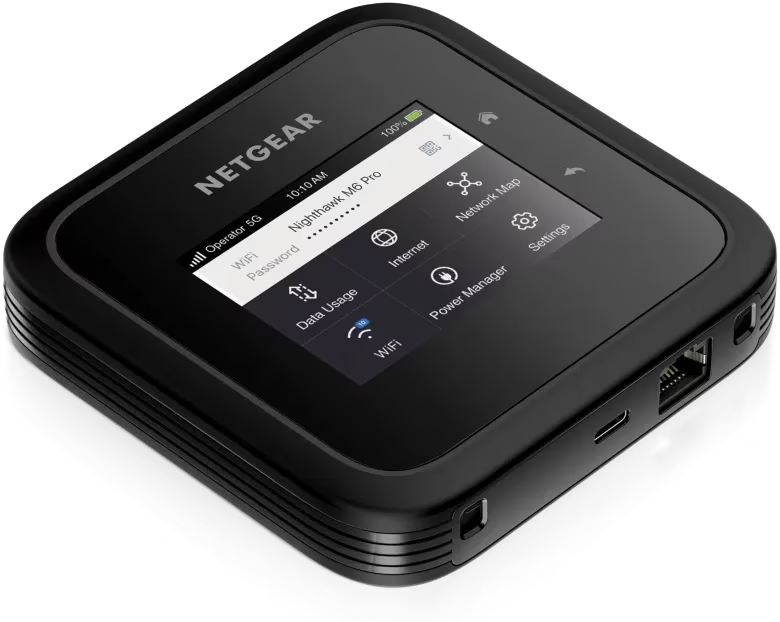
A device with a built-in screen allows you to monitor data usage, check signal strength, and view the WiFi password instantly. This eliminates the need to log into a web interface for basic status checks.
Empowering Business and Travel
Portable WiFi is not just a gadget; it is a business tool.
For Remote Teams
Organizations with distributed teams need to ensure their staff can work from anywhere without compromising security. issuing portable routers creates a standardized, secure connection method for all employees.
For Event Organizers
Trade shows and outdoor events often suffer from congested networks. Bringing your own dedicated connection ensures point-of-sale systems remain online and demos run smoothly.
For Travelers
Avoiding exorbitant international roaming fees is a major financial benefit. By using a portable router with a local data SIM, travelers can enjoy low-cost internet access for all their devices.
Magnus: Your Partner in Networking & Wireless
Finding the right hardware is the first step toward seamless connectivity. At Magnus, we understand that technology is the backbone of modern business operations. As your trusted IT distribution partner, we are dedicated to delivering cutting-edge products that keep your business moving forward.
We specialize in providing top-tier solutions across Networking & Wireless, Security Surveillance, Unified Communication, and Server & Storage domains. Our commitment to excellence ensures that when you source your technology through Magnus, you are getting robust, reliable, and high-performance equipment tailored to your specific requirements. We don’t just sell products; we enable connections.
Conclusion
In a world that demands constant availability, being tethered to a wall outlet or a risky public network is no longer an option. Portable WiFi offers the freedom to work, play, and communicate on your own terms. It provides security, speed, and the flexibility to take your office wherever you go.
Whether you are upgrading your personal travel gear or seeking enterprise-level networking solutions for your workforce, choosing the right equipment is vital. Contact Magnus today to explore how our Networking & Wireless solutions can keep you connected when it matters most.
Frequently Asked Questions
1. Can portable WiFi work internationally?
Yes, most portable WiFi devices are unlocked, meaning they can accept SIM cards from different carriers worldwide. However, you must ensure the device supports the frequency bands used in the country you are visiting.
2. How many devices can I connect to one portable WiFi unit?
This varies by model. Basic units typically support 5 to 10 devices, while enterprise-grade or high-end consumer models can often support anywhere from 15 to 32 simultaneous connections.
3. Is portable WiFi fast enough for gaming or video calls?
Generally, yes. A 4G LTE connection is usually sufficient for standard video conferencing (Zoom, Teams). For high-definition video streaming or low-latency gaming, a 5G portable WiFi device is recommended for the best experience.
4. Does portable WiFi work in rural areas?
The device relies on cellular coverage. If your mobile phone has a signal, the portable WiFi likely will too. In fact, due to stronger antennas, dedicated devices often maintain a connection in fringe areas where phones might drop out.
5. Is it difficult to set up a portable WiFi device?
Setup is usually very simple. You insert a compatible SIM card, power on the device, and connect your laptop or phone using the WiFi password displayed on the screen or printed on the device label. No technical expertise is required.