


May 18 2026
/
Cat 7 Ethernet Cable Color Code: A Complete Wiring Guide
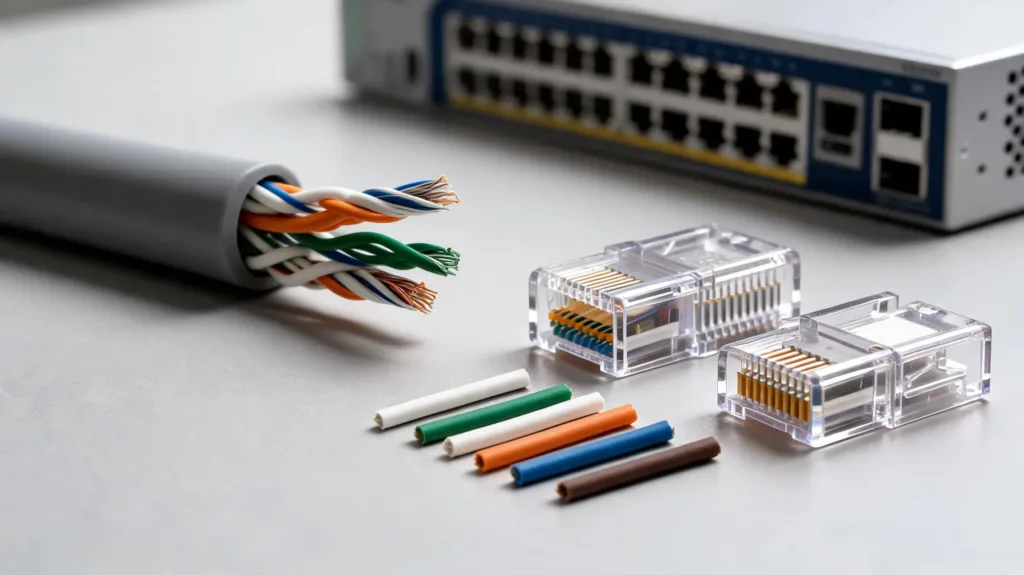
Establishing a resilient and high-performing network infrastructure requires precision at every level of deployment. Category 7 (Cat 7) Ethernet cables represent a significant advancement in networking technology, engineered to support ultra-fast data transfer rates and minimize signal interference. For IT professionals and enterprise integrators, understanding the proper termination techniques for these advanced cables is essential to guarantee optimal network performance.
Properly wiring a Cat 7 cable ensures that your business receives the cutting-edge technology solutions it deserves. A single misaligned wire can severely degrade data transmission, leading to packet loss and compromised system reliability. By mastering the standardized Ethernet color codes, network engineers can deliver unparalleled solutions marked by a seamless blend of quality and value.
This comprehensive guide details the standardized color codes for Cat 7 Ethernet cables, providing the exact specifications needed to construct a robust, future-proof network architecture.
The Architecture of Category 7 Cables
Cat 7 cables are distinguished by their rigorous shielding specifications. Unlike earlier iterations of Ethernet cabling, Cat 7 utilizes a Shielded/Foiled Twisted Pair (S/FTP) construction. This means that each individual pair of wires is wrapped in a protective foil shield, and an overall braided shield encompasses all four pairs.
This meticulous design drastically reduces alien crosstalk and electromagnetic interference (EMI). Because the structural integrity of the cable is so vital to its performance, maintaining the correct color sequence during termination is not merely a recommendation; it is a strict technical requirement to maintain the shielding benefits and achieve frequencies up to 600 MHz.
Standardized Wiring Schemes: T568A and T568B
The telecommunications industry relies on two primary wiring standards for terminating twisted-pair cables: T568A and T568B. Both standards dictate the arrangement of the eight individual wires inside the RJ45 (or GG45/TERA) connector.
While both configurations are fully capable of supporting Gigabit and 10-Gigabit Ethernet speeds, T568B is the most widely adopted standard in commercial installations across the United States. Consistency is the most critical factor. Organizations must ensure that the same standard is utilized on both ends of a straight-through cable to foster a seamless technology experience.
Cat 7 Wiring Color Code Chart
The following table outlines the exact pinout and color sequencing for both the T568A and T568B standards.
Pin Number | T568A Color Scheme | T568B Color Scheme |
|---|---|---|
Pin 1 | White/Green | White/Orange |
Pin 2 | Green | Orange |
Pin 3 | White/Orange | White/Green |
Pin 4 | Blue | Blue |
Pin 5 | White/Blue | White/Blue |
Pin 6 | Orange | Green |
Pin 7 | White/Brown | White/Brown |
Pin 8 | Brown | Brown |
Best Practices for Cat 7 Termination
Achieving a flawless connection requires professional-grade tools and a commitment to excellence during the installation process. Our trusted partners consistently follow these structured steps to ensure maximum reliability:
- Gather the necessary equipment: Ensure you have a precise cable stripper, heavy-duty flush cutters, and a crimping tool specifically designed for shielded Cat 7 connectors.
- Strip the cable jacket: Carefully remove approximately two inches of the outer PVC or LSZH jacket, ensuring the internal braided shield remains intact.
- Manage the shielding: Fold the braided shield backward over the cable jacket. This braid must make solid contact with the metal housing of the shielded connector to ground the cable properly.
- Remove the foil: Carefully unwrap the foil shielding from each individual twisted pair.
- Untwist and align: Untwist the wire pairs only as much as necessary to lay them flat. Arrange them precisely according to your chosen color code (T568A or T568B).
- Trim and terminate: Cut the wires in a perfectly straight line, leaving exactly enough length to reach the end of the connector. Insert the wires into the shielded connector, verify the color sequence through the housing, and securely crimp the assembly.
Securing Your Network Infrastructure
Deploying superior networking cables is an investment in the operational continuity and efficiency of your enterprise. By adhering to the stringent color codes and termination standards required by Cat 7 cabling, organizations can establish a network infrastructure that handles immense bandwidth with zero compromises.
We remain dedicated to fostering mutually beneficial relationships with IT professionals, ensuring your business successfully navigates complex infrastructure upgrades. For further technical guidance or to explore cutting-edge connectivity products, consult with your trusted IT distribution partner today to construct a network built for the demands of tomorrow.
Frequently Asked Questions
1. What is the primary difference between T568A and T568B?
The only technical difference between the two standards is the reversal of the orange and green wire pairs (Pins 1, 2, 3, and 6). Functionally, they perform identically, provided the same standard is maintained on both ends of the cable.
2. Can I use standard RJ45 connectors for Cat 7 cables?
While standard RJ45 connectors can physically fit, they are strongly discouraged. Cat 7 cables require specialized shielded connectors (such as shielded RJ45, GG45, or TERA) and thicker gauge channels to properly ground the cable and maintain the S/FTP performance standards.
3. What happens if the color code is wired incorrectly?
Incorrect wiring can lead to a complete loss of connectivity. Even if the data successfully transmits, mismatched pairs will cause excessive crosstalk, severely degrading network speeds and reliability.
4. Do I need to ground both ends of a Cat 7 cable?
Yes. To effectively eliminate electromagnetic interference, the braided shield of the Cat 7 cable must be properly grounded at both ends using shielded connectors and compatible patch panels or networking equipment.
5. Can a Cat 7 cable be used to create a crossover connection?
Yes. To create a crossover cable, one end must be terminated using the T568A standard, and the opposite end must be terminated using the T568B standard. However, modern network switches typically feature Auto-MDIX technology, which automatically detects and corrects connections, making manual crossover cables largely obsolete.