


May 12 2026
/
Punch Down Tool for Network Cabling?
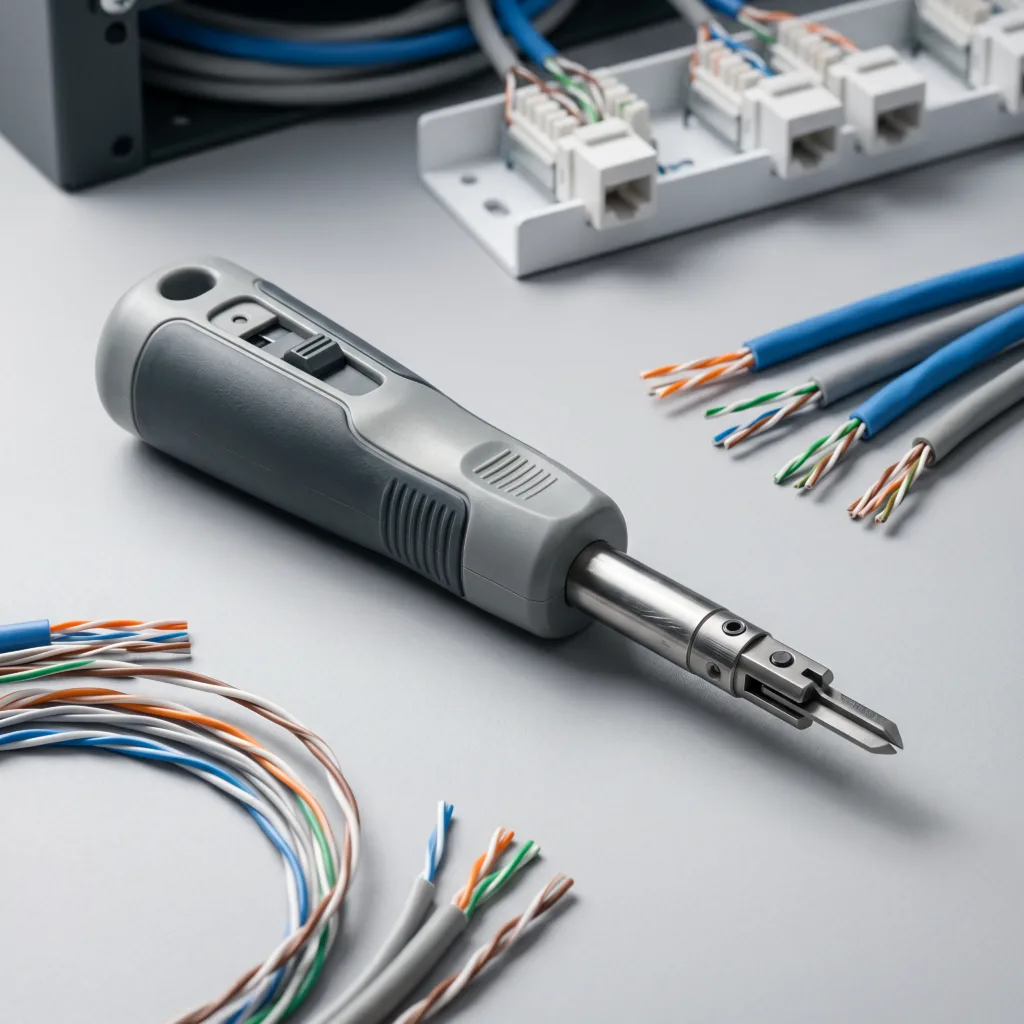
A punch down tool is a specialized handheld instrument used by network technicians to terminate Ethernet cables into punch down blocks, patch panels, and keystone jacks. It securely seats solid copper wires into metal insulation displacement connectors, seamlessly cutting off excess wire to ensure reliable and permanent network connections.
Key Highlights
- Precision Termination: Ensures secure, low-resistance connections for solid copper network wires.
- Interchangeable Blades: Accommodates various industry-standard termination blocks, including 110, 66, and Krone.
- Impact Mechanism: Utilizes spring-loaded force to seat and trim wires simultaneously, increasing installation efficiency.
Overview of Network Cabling and Termination
Establishing a robust and reliable IT infrastructure requires meticulous attention to physical layer connectivity. Network cabling serves as the fundamental backbone of modern enterprise communication, facilitating data transfer across servers, workstations, and security surveillance systems. To ensure optimal performance and mitigate signal loss, technicians rely on precision instruments for cable termination. The punch down tool emerges as an indispensable device in this process.
Proper termination is a critical factor in maintaining data integrity. When establishing localized networks or expansive data centers, technicians must connect individual copper wires within Ethernet cables to centralized patch panels or wall-mounted keystone jacks. Doing this manually without proper equipment often leads to loose connections, signal degradation, and eventual network failure. A professional-grade punch down tool resolves this by forcefully inserting the wire into an Insulation Displacement Connector (IDC). The connector automatically strips the wire’s jacket to make a secure electrical contact, while the tool’s built-in blade cleanly removes any surplus wire. This mechanical efficiency guarantees uniformity across hundreds of network ports, maintaining the high standards expected in enterprise IT deployments.
Types of Punch Down Tools
Understanding the specialized equipment available allows IT professionals to select the right instrument for their specific infrastructure requirements. Punch down tools generally fall into three distinct categories based on their functional mechanisms.
- Standard (Non-Impact) Tools: These are basic, manual tools that require the user to apply all the physical force necessary to push the wire into the slot. They lack a spring-loaded mechanism and are typically used for very small jobs or occasional repairs. While cost-effective, they do not offer the consistent seating force required for large-scale enterprise installations.
- Impact Tools: The industry standard for professional cabling, impact tools feature an internal spring mechanism. As the technician pushes down on the wire, the spring compresses and then releases, delivering a sharp, consistent burst of force. This action simultaneously seats the wire securely into the terminal and drives the blade to slice off the excess wire. Most impact tools offer adjustable pressure settings (High/Low) to accommodate different wire gauges and block types.
- Multi-Wire (Automatic) Tools: Designed for high-volume data center environments, these specialized tools can punch down multiple wires or an entire modular jack in a single motion. They drastically reduce termination time and minimize physical fatigue for technicians handling thousands of connections.
Comparison of Common Punch Down Blades
Selecting the correct blade is just as important as choosing the tool itself. Different termination blocks require specific blade profiles to ensure proper seating without damaging the hardware.
Factor | 110 Blade | 66 Blade | Krone Blade |
|---|---|---|---|
Primary Application | Data networks (Cat5e, Cat6, Cat6a) | Voice/Telephone networks | European/International telecom |
Supported Hardware | Patch panels, keystone jacks, 110 blocks | 66 cross-connect blocks | Krone LSA-PLUS blocks |
Blade Design | Flat, single-point cutter on one side | U-shaped cutter | Scissor-like angular cutter |
Enterprise Usage | Extremely High | Moderate (Legacy systems) | Regional/Specialized |
The Termination Process: How It Works
Executing a flawless wire termination requires a systematic approach. By following standard operational procedures, technicians can ensure sustained network reliability.
Step 1: Cable Preparation
Begin by stripping approximately two inches of the outer cable jacket to expose the twisted pairs inside. Carefully separate the twisted pairs and arrange them according to the desired wiring standard (usually T568A or T568B).
Step 2: Wire Placement
Align the individual wires over their corresponding color-coded slots on the patch panel or keystone jack. Pull each wire taut across the Insulation Displacement Connector (IDC) slot, ensuring it rests perfectly centered over the metal contacts.
Step 3: Tool Positioning
Position the punch down tool vertically over the wire. It is crucial to ensure the cutting side of the blade faces outward, toward the excess wire. Reversing the blade direction will cut the active wire and sever the network connection.
Step 4: The Punch Down Action
Press the tool downward firmly in a straight, fluid motion. If using an impact tool, continue pressing until you hear and feel a distinct “click,” indicating the spring has deployed. This impact forces the wire into the IDC, piercing the insulation to establish a connection, while the blade shears off the protruding tail.
Step 5: Inspection
Visually inspect the termination. The wire should be seated deeply and evenly within the slot, and the cut should be clean with no stray copper strands protruding, which could cause short circuits or cross-talk.
Use Cases and Applications
Professional punch down tools are deployed across various infrastructure projects to guarantee optimal data transmission.
- Enterprise Patch Panels: Centralized distribution frames in server rooms require hundreds of reliable terminations. Punch down tools ensure that Cat6 and Cat6A cables are securely fastened to patch panels, enabling seamless routing to network switches.
- Workstation Keystone Jacks: Terminating cables at the user end requires precision. Technicians use these tools to wire the modular wall outlets that connect employee computers and VoIP phones to the broader corporate network.
- Telecommunication Cross-Connects: When integrating legacy voice services or building wide-area telephone systems, technicians use punch down tools equipped with 66-blades to manage complex wire routing on traditional distribution blocks.
Benefits of Professional Punch Down Tools
Investing in high-quality termination equipment yields significant operational advantages for IT integration teams.
- Consistent Reliability: By delivering a standardized level of force, impact tools eliminate the inconsistencies of manual pushing, drastically reducing the occurrence of faulty network nodes and intermittent connectivity issues.
- Operational Efficiency: Spring-loaded mechanisms and automatic wire-trimming capabilities allow technicians to complete installations much faster, ensuring large-scale infrastructure projects meet their deadlines.
- Reduced Physical Strain: Ergonomically designed tools absorb much of the repetitive shock associated with cabling, protecting technicians from hand fatigue and repetitive strain injuries during extensive deployments.
Challenges and Limitations
Despite their necessity, deploying these tools involves specific operational considerations.
- Operator Skill Requirement: Incorrect tool alignment or using the wrong blade direction can easily destroy keystone jacks or ruin cable runs. Technicians require proper training to utilize the equipment effectively.
- Hardware Wear and Tear: The blades on punch down tools dull over time after thousands of cuts. Failing to replace worn blades results in incomplete wire trimming, causing shorts and degrading network performance.
- Space Constraints: Operating a standard punch down tool requires clear overhead space to apply downward pressure. Terminating cables in highly congested server racks or confined ceiling spaces can be physically challenging and may require specialized angled tools.
Trends and Future Scope
As network infrastructure evolves to support greater bandwidth, the tools used to construct these networks are also advancing.
- Ergonomic Enhancements: Manufacturers are increasingly focusing on shock-absorbing grips and reduced-recoil mechanisms to enhance technician comfort during massive hyperscale data center build-outs.
- Integration with Smart Technologies: Emerging tools feature built-in LED indicators or basic continuity testers within the handle, allowing technicians to verify the electrical connection immediately upon punching down the wire.
- Adaptation for High-Speed Copper: As Cat 8 cabling becomes more prevalent for 25G and 40G networks, punch down tools are being refined to handle thicker wire gauges and specialized shielding requirements without compromising the cable’s structural integrity.
Visual Section: Anatomy of a Punch Down Tool
Below is a textual diagram outlining the core components of a standard impact punch down tool to help you understand its structural engineering.
[ Impact Punch Down Tool ]
  │
  ├── Interchangeable Blade (110/66) ──> Cuts and seats the wire simultaneously.
  │
  ├── Blade Release Mechanism ─────────> Twist-and-lock dial for rapid blade swapping.
  │
  ├── Adjustable Impact Dial ──────────> (High / Low) controls the spring tension.
  │
  ├── Internal Spring Mechanism ───────> Stores and releases kinetic energy for termination.
  │
  └── Ergonomic Handle ────────────────> Shock-absorbing rubber grip for technician comfort.
Why Choose Magnus Infotech as Your Technology Partner
Magnus is your trusted IT distribution partner dedicated to delivering seamless technology solutions. We operate as the crucial bridge between global tech vendors and regional system integrators across the Middle East.
- Extensive Product Portfolio: We specialize in providing cutting-edge products in the domains of Networking, Security Surveillance, Unified Communication, and Server Storage, ensuring you have the exact hardware required for any deployment.
- Strategic Regional Presence: Headquartered in the Al Tawhidi Building on Al Mankhool Street, Dubai, our centralized logistics operation ensures rapid fulfillment and robust supply chain reliability for B2B IT companies throughout the UAE and the broader Gulf region.
- Commitment to Excellence: Our unwavering commitment is to provide you with an exceptional experience. We do this by delivering unparalleled value-added distribution services, technical support, and channel enablement.
Elevate your infrastructure projects with a reliable distribution partner. Contact Magnus Infotech today to explore our comprehensive networking solutions.
Frequently Asked Questions
Can I use a flathead screwdriver instead of a punch down tool?
While it is physically possible to push a wire into an IDC slot using a small screwdriver, it is highly discouraged for professional networks. A screwdriver does not provide uniform pressure, risks damaging the delicate metal contacts, and fails to trim the excess wire, leading to unreliable connections and severe signal degradation.
What is the difference between a 110 block and a 66 block?
A 66 block is traditionally used for analog voice and legacy telephone systems, featuring large metal clips suitable for thicker wires. A 110 block is engineered specifically for high-speed data networks (like Cat5e and Cat6), maintaining the tight twists of the wire pairs to reduce cross-talk and maximize bandwidth.
How do I know whether to use the High or Low impact setting?
The Low setting is generally utilized for standard keystone jacks and lighter gauge wires, preventing accidental damage to the plastic housing. The High setting is reserved for thicker gauge wires (such as Cat6a) or heavy-duty patch panels that require more kinetic force to pierce the wire insulation and seat properly.
Why did my punch down tool cut the wrong end of the wire?
Punch down blades are designed with a cutting edge on only one side. If the tool is positioned backward, the cutting edge will face inward toward the active network cable, severing the vital connection rather than the excess scrap wire. Always ensure the “cut” side of the blade faces outward before pressing down.
How often should I replace the blade on my tool?
Blade longevity depends entirely on usage volume. However, as a general rule of thumb for enterprise technicians, if you notice that the tool is consistently failing to cleanly shear off the excess wire in a single punch, the blade has become dull and must be replaced immediately to ensure continued termination quality.